
Email marketing continues to be one of the most effective ways for businesses to communicate, but its success greatly relies on whether emails actually land in the recipient’s inbox. A key element affecting deliverability is accurate email authentication, which is where SPF comes into play. The Sender Policy Framework (SPF) tester ensures that your domain is authorized to send emails, helping to prevent spoofing and enhancing credibility with email services. This valuable tool verifies your domain’s email authentication configuration, confirming that your messages are dispatched from authorized servers instead of being marked as spam. By swiftly detecting and resolving SPF-related issues, you can dramatically enhance email deliverability, safeguard your sender reputation, and improve inbox placement in just a matter of minutes.
In this detailed guide, we will delve into what SPF is, its importance, how SPF testers function, and how you can leverage them to enhance your email deliverability quickly.
What Is SPF and Why It Matters
Understanding Sender Policy Framework (SPF)
SPF, or Sender Policy Framework, is a protocol used for email verification aimed at identifying and stopping email spoofing. It enables domain owners to indicate which mail servers are permitted to send messages on their behalf.
This specification is implemented via a DNS record referred to as an SPF record. Upon receiving an email, the recipient’s mail server verifies the sender’s authorization by consulting this SPF record.
Why SPF Is Crucial for Email Deliverability
If your SPF record isn’t set up correctly, there’s a higher chance your emails will be marked as spam or not delivered at all.
- Prevents spoofing attempts: Blocks unauthorized users from pretending to be you
- Enhances sender credibility: Fosters trust with email services such as Gmail, Outlook, and Yahoo
- Increases inbox delivery rates: Raises the likelihood that your emails will land in the inbox
- Strengthens security compliance: Functions in conjunction with DKIM and DMARC to ensure complete authentication
What Is an SPF Tester?
The Role of an SPF Tester
An SPF tester is a utility designed to evaluate your domain’s SPF record for correct setup. It identifies mistakes, misconfigurations, and adherence to standard practices. By examining your SPF record, this tool helps ensure it is accurately configured and error-free, pinpointing issues such as syntax errors, excessive DNS queries, or unauthorized senders that could hinder email delivery.
What an SPF Tester Checks
- Validation of the SPF record’s syntax
- Total DNS lookups (should not go beyond 10)
- Approved IP addresses and include directives
- Existence of “all” mechanisms (~all, -all, etc.)
- Duplicated or contradictory entries
SPF testers assist in pinpointing problems, enabling you to resolve them prior to affecting your email deliverability.
How SPF Works Behind the Scenes
SPF Authentication Process
When an email is dispatched from your domain, the server that receives it looks up the SPF record in your domain’s DNS. It verifies whether the sending IP address is permitted. Depending on this assessment, the email can be classified as passed, failed, or given a soft fail designation.
The SPF authentication process starts when the receiving mail server consults the sender’s domain SPF record in DNS to confirm the authorization of the sending IP address. This validation results in the email being labeled as pass, fail, or another category, influencing its delivery status.
SPF Result Types Explained
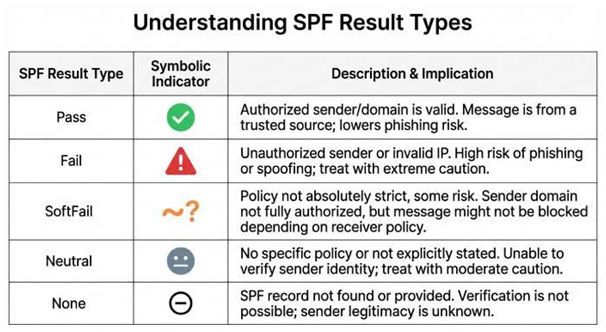
SPF results determine the authorization status of an email sender, categorizing it into various outcomes: Pass means the sender is authorized, Fail indicates the sender lacks authorization, SoftFail suggests a degree of suspicion without outright rejection, Neutral shows that there is no strict policy in place, and None implies that no SPF record exists. These results assist receiving servers in making informed choices about whether to accept, flag, or decline incoming emails according to the domain’s authentication policies.
How to Use an SPF Tester Effectively
Step-by-Step Guide to Testing SPF
Testing your SPF is straightforward and quick:
- Input your domain into the SPF testing tool.
- Execute the test to obtain your SPF record.
- Examine the findings for any problems.
- Correct any mistakes in your DNS configuration.
- Perform the test again to ensure everything functions properly.
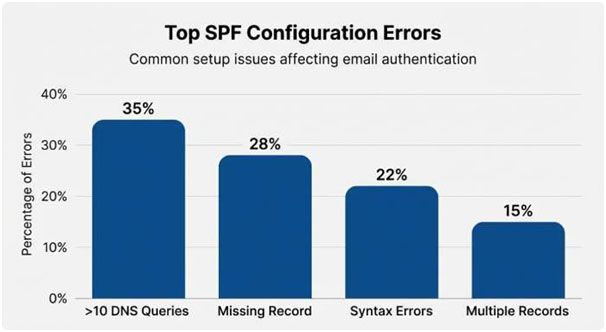
Common SPF Errors to Watch For
Minor errors can significantly impact how your emails perform.
- Excessive DNS queries: SPF has a limit of 10 lookups
- Absence of SPF record: This means there’s no authentication set up
- Syntax errors: Mistakes in typing or formatting
- Conflicting mechanisms: Duplicate entries that create ambiguity
- Multiple SPF records: Only one SPF record is permitted for each domain.
Best Practices for Optimizing SPF Records
Keep Your SPF Record Clean and Efficient
An efficiently configured SPF record is both brief and powerful.
- Utilize only essential include directives
- Eliminate any obsolete or unnecessary entries
- Merge similar services whenever feasible
- Stay within DNS lookup restrictions
Use “-all” for Strong Protection
The “-all” directive rigorously upholds your SPF policy by denying any unauthorized senders. In contrast, “~all” (soft fail) is beneficial for testing purposes. Transitioning to “-all” once your settings are reliable enhances security. Implementing the “-all” directive in your SPF record ensures strict validation by rejecting emails from unapproved sources. After thorough testing of your SPF setup, moving from “~all” to “-all” greatly fortifies your domain’s security and the authenticity of your emails.
Combine SPF with DKIM and DMARC
Having SPF is insufficient on its own. To ensure optimal email deliverability, pair it with:
- DKIM (DomainKeys Identified Mail): Incorporates a digital signature into your emails.
- DMARC (Domain-based Message Authentication, Reporting & Conformance): Ensures SPF and DKIM are aligned and offers reporting features.
Benefits of Using an SPF Tester
Instant Insights and Error Detection
SPF testers offer instantaneous feedback, enabling you to swiftly pinpoint and address any problems that could hinder deliverability. By assessing your domain’s setup in real time, these tools provide immediate insights. They rapidly detect mistakes and misconfigurations, helping you rectify issues before they impact your email delivery.
Improved Email Performance
By properly configuring settings, SPF testers contribute to:
- Decreasing bounce rates
- Boosting open rates
- Improving the overall effectiveness of campaigns
Better Security and Brand Protection
SPF testers play a crucial role in ensuring that your domain isn’t misused, thereby safeguarding your brand’s reputation and maintaining customer trust. By blocking unauthorized senders from using your domain, these tools enhance the integrity of your brand and foster confidence among your audience.
Advanced SPF Optimization Techniques
Flattening Your SPF Record
SPF flattening is the process of substituting “include” directives with specific IP addresses to minimize DNS queries. This method is particularly beneficial when your SPF record is nearing the 10-lookup threshold.
Nonetheless, it is essential to keep it updated regularly since third-party IP addresses can change.
Monitoring SPF Performance
Ongoing oversight guarantees the efficiency of your SPF record.
- Consistent verification
- Notifications for any modifications or issues
- Linkage with DMARC reports
Handling Third-Party Senders
Numerous companies utilize various platforms such as CRM systems, marketing applications, and support tools for their email communications. It’s crucial to incorporate each of these services into your SPF record to prevent issues with authentication. When employing multiple third-party services for sending emails, ensuring they are listed in your SPF record is essential for maintaining proper authorization. Neglecting to do this may result in authentication errors, which can adversely affect email delivery rates.
Troubleshooting SPF Issues
Emails Still Going to Spam?
Even if your SPF record is accurate, emails might still be routed to the spam folder due to:
- A negative sender reputation
- Low engagement from your audience
- Absent DKIM or DMARC configurations
- Content or formatting that triggers spam filters
SPF Pass but DMARC Fail
This typically suggests there are alignment problems between the SPF record and the “From” domain. Make sure your domains are correctly aligned for DMARC compliance. When an SPF check passes but DMARC fails, it often points to a misalignment between the sending domain and the “From” address. To resolve this, ensure that the domain in your SPF record corresponds with the domain in your email headers, allowing DMARC to validate it properly.
Tools and Resources for SPF Testing
Popular SPF Testing Tools
Numerous trustworthy tools exist for the purpose of testing and verifying SPF records.
- In-depth diagnostics
- Analysis of lookup counts
- Syntax checks
- Improvement suggestions
Some notable examples are MXToolbox, Kitterman SPF Validator, and DMARC Analyzer.
Final Thoughts: Take Control of Your Email Deliverability
The AutoSPF SPF tester is a simple and effective tool that can boost your email delivery rates in just minutes. By checking that your SPF record is correctly configured, AutoSPF not only improves your chances of landing in the inbox but also strengthens your domain’s security and reputation.
Nonetheless, SPF is merely a component of a comprehensive email authentication approach. For optimal outcomes, it’s advisable to use SPF in conjunction with DKIM and DMARC, keep an eye on your settings, and remain informed about the latest best practices.
In the highly competitive digital environment of today, even minor enhancements in deliverability can translate into significant increases in engagement and conversions. Start utilizing an SPF tester now to take charge of your email marketing success.
