It is one of the most popular or easy way to monetize your website. You can easily add Google AdSense to your website properly and start earning. In this content, we will show how to add Google AdSense in website along with sharing some good practice and few tips to increase your earnings.
Google AdSense is an nothing but advertising network run by Google that provides bloggers and website owners an opportunity to make money by showing advertisement on their websites. These ads are aimed by site content and audience.
You don’t have to deal with advertisers or others or worry about getting money. Google always make relationships with the advertisers. They collect payments, take their allowance, and send your share to you.
AdSense also offers cost-per-click ads i.e. CPC that means you earn money every time a user clicks on ad showing on your website. The amount you received per click depends on different factors.
First you need to sign up for a Google AdSense account. If you have a Gmail account, then you can use an old account.
Once you’ve filled up your application, you will get an email within 5–8 hours mentioning you whether you have cleared the first step of the review process. If you cleared the first step, then you can easily log in to your AdSense account and get your AdSense code.
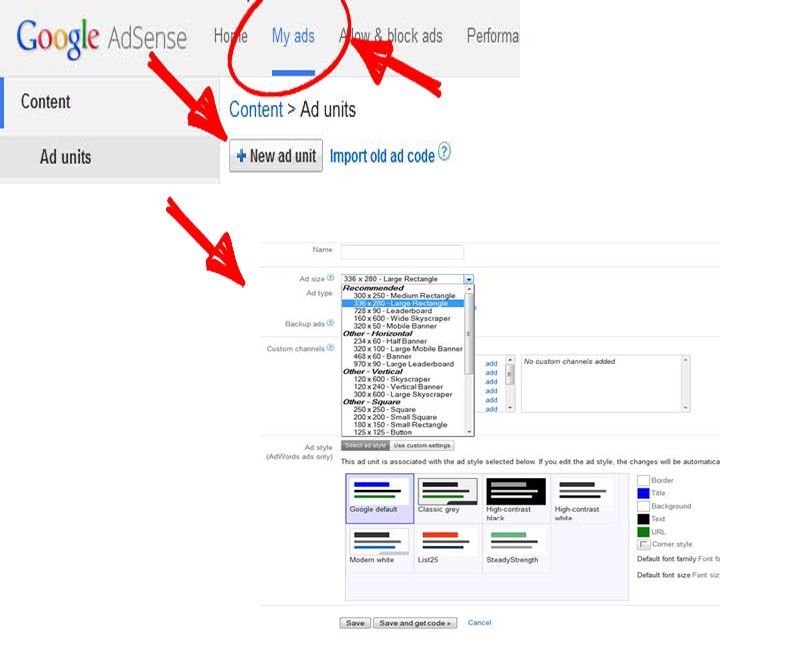
Clicking on the My ads tab and then click on the New ad unit button will bring you to create new ad page. On this page, you need to choose the Ad size, type and style etc.
Name of the Ad is used for own purposes, so you can name it like “Home top ad”. Google offers a variety of ad sizes i.e. 728 X 90, 320 X 100 etc.
The next thing is to choose Ad type i.e. Text ads, display ads etc, we recommend having both Text & display ads. Ad style also allows you to configure the display of your text based ad units. We suggest using your site’s color combination scheme for better results.
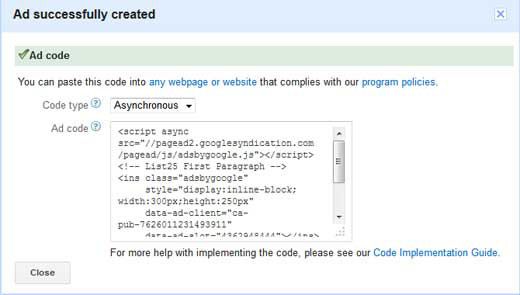
Once you’re done with this configuration set up, simply click on Save and get code button. You will be notified with a message “Ad successfully created”, and you will also get the Ad code.
Copy your Ad code and paste it between the opening <BODY> and closing </BODY> tags of your source code where you would like to show.
Modern web applications rarely live alone. A customer portal, an internal order-management console, or a…
An invoice lands in the accounts inbox for equipment delivered three weeks ago. The supplier…
A Google Ads management campaign can look healthy in the dashboard and still waste money…
A potential customer arrives on your website after searching for a service you provide. They…
In the business world, there’s no such thing as a new idea. The best we…
Both of these work. Both are difficult. And anyone telling you one is obviously better…
View Comments
Awesome! Its actually remarkable post, I have got much clear idea concerning from this post.